Effective cable management is crucial for a clean workstation setup. It enhances safety and efficiency by reducing tripping hazards and equipment damage. Key tools include cable ties, clips, and trays to organize cables neatly. Labeling cables simplifies troubleshooting and maintenance. Regular checks help guarantee functionality and safety. Sustainable materials support long-term organization. An ergonomic workspace fosters productivity. A well-managed setup not only looks good but also improves functionality. Discover more techniques to optimize your workspace.
Key Takeaways
- Start by unplugging and sorting cables to identify necessary ones, discarding those that are unnecessary for a cleaner setup.
- Use cable trays and clips to secure cables under the desk, reducing visible clutter and enhancing workspace aesthetics.
- Label both ends of each cable for easy identification and efficient troubleshooting, streamlining future maintenance efforts.
- Invest in durable tools like cable ties and sleeves, ensuring a professional appearance and long-lasting organization in high-use environments.
- Conduct regular maintenance checks to ensure cables remain tidy and functional, addressing loose cables and reorganizing as necessary.
Importance of Effective Cable Management
Effective cable management is essential in any workplace. It greatly reduces tripping hazards and prevents equipment damage, contributing to a safer workspace. An organized cable setup not only improves accessibility to connections but also enhances workflow. This organization allows for quicker troubleshooting, improving overall operational efficiency. A clean workstation boosts visual appeal, which helps foster a positive workplace culture. Additionally, proper cable management adheres to safety and fire codes, improving airflow around devices. This, in turn, enhances equipment performance and longevity. Regular implementation of effective cable management practices facilitates maintenance and upkeep, sustaining an orderly workspace over time. Businesses should prioritize these strategies to create an efficient and inviting environment for their employees. Under desk cable management solutions offer versatile options for organizing cables without drilling, enhancing workspace aesthetics while preventing cable tangling.
Essential Tools and Products

When choosing cable management tools and products, businesses should focus on practicality and durability. A reliable cable management system includes essential items such as cable ties, cable clips, and cable sleeves. These products help secure cables while providing a professional appearance. Cable clips easily attach cables along desk edges, preventing tangling and allowing for quick access. Bundling cables with cable sleeves not only enhances the aesthetic but also makes future modifications easier. Additionally, using power strips with mounts keeps electrical connections organized and accessible. Investing in high-quality cable management solutions, like the Hexcal Cable Management Kit, guarantees a neat and clutter-free workspace. This all-encompassing approach helps maintain an efficient and organized desk cable management setup. A cable management box can also be an excellent addition to your setup, as it conceals power strips and cords, enhancing safety and aesthetics.
Recommended Products


Order for 10 Neat Patch MINI 1U Low Profile Cable Management Units
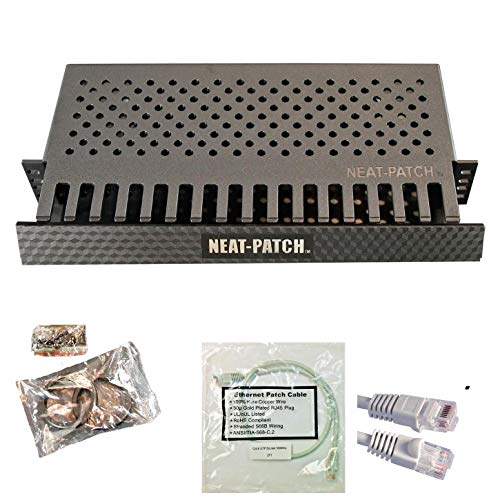
Order for 10 Neat Patch MINI 1U Low Profile Cable Management Units
Step-by-Step Guide to Organizing Cables

Organizing cables can substantially enhance workspace efficiency and aesthetics. Begin by unplugging all devices to identify necessary cables and discard any that are unnecessary. Next, sort the cables by type and length. This allows for easier planning and helps in using cable management techniques effectively. Use cable trays and clips to secure cables under the desk, which will minimize clutter and improve the visual appeal. Label both ends of each cable to streamline troubleshooting, making it easier to identify during plug-and-unplug tasks. Finally, after organizing, test all devices to verify functionality. Incorporating fire-resistant materials in cable organizers can enhance safety by reducing fire hazards. This thorough approach not only keeps the workspace safe but also supports proper cable routing for future adjustments in equipment and enhances overall efficiency.
Recommended Products

Steel cable channel keeps cords, adapters, and power strips neatly organized under your desk.

As an affiliate, we earn on qualifying purchases.
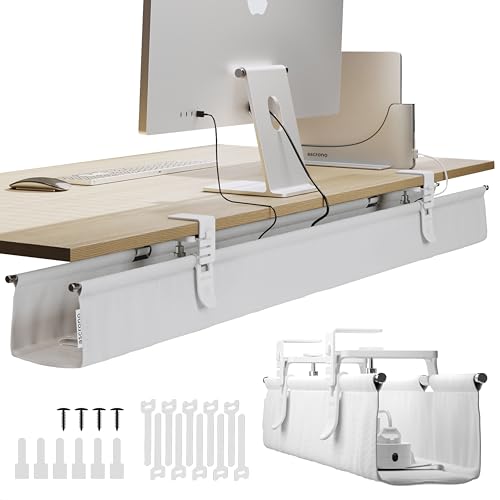
PREMIUM AMERICAN BRAND: Ascrono delivers cable management under desk products with satisfaction. Innovated cable managment and cord organization with trusted support. Experience a truly organized space with our under desk cable holder.

SPECS – Cable Tray Straight Section | Width: 4” Inch (101.6mm) | Length: 5’ Feet | Depth: 2” Inch (mm) | Color – Chrome | Material – Zinc Plated Steel
Best Cable Management Solutions for Your Workspace

A variety of cable management solutions can greatly improve any workspace’s organization and efficiency. Cable management trays organize power strips and cables under desks, helping to reduce clutter and enhance aesthetics. Cable clips allow users to secure cables along edges and surfaces, preventing tangling and ensuring easy access to devices. Additionally, cable sleeves and zip ties can bundle multiple cables together, creating a uniform look for better workspace organization. Implementing power strips with mounts places power sources conveniently out of sight. Color-coded organization systems simplify the identification and sorting of cables, which can enhance efficiency and reduce confusion. Adopting these cable management strategies fosters a professional atmosphere that promotes productivity. Incorporating wall-mounted options, such as toothbrush holders with compartments, can also serve as multifunctional solutions for organizing small items and optimizing space.
Recommended Products

Keeps cords and power supplies organized and hidden from view

UNIQUE NEWLY DESIGN: This under-desk cable management's revolutionary new design hides unsightly wires, revealing a perfectly tidy space! Built-in five velcros to fix your cable securely, while the locking mechanism allows you to open it to check and organize the cables inside with ease.

Add A Cable Management Under Desk: No more mess. No more hanging or tangled wires. Giving you a total wire management under desk. Organizes any data cables, power cords, outlet strips off the floor. You will no longer have to worry about wires dangling or the robot vacuum sucking the cables out.
Under-Desk Cable Management Techniques
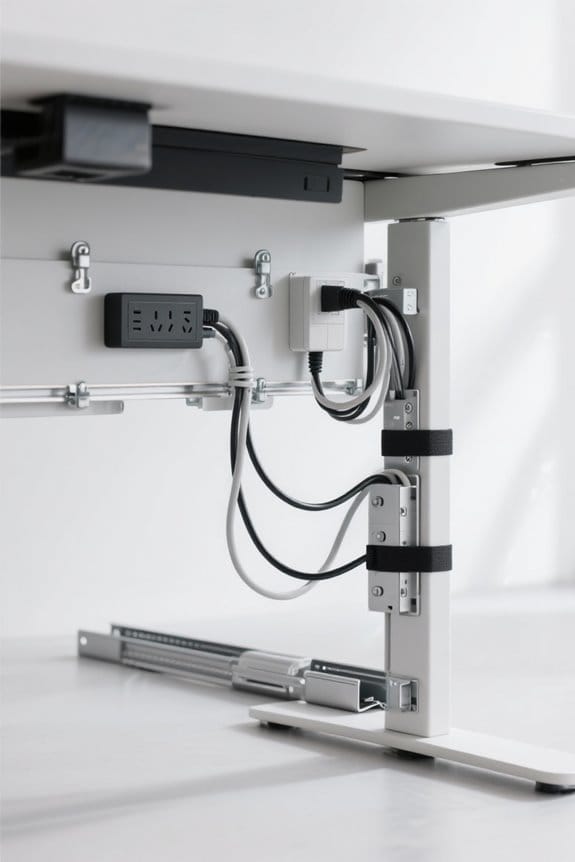
Effective under-desk cable management techniques can greatly enhance workspace safety and efficiency. Utilization of cable trays efficiently organizes power strips and excess cords, reducing clutter and improving airflow. To keep cables neatly routed, adhesive clips can be applied along desk edges, minimizing tangles and enhancing accessibility. It is important to keep a reasonable amount of slack in cables, which prevents damage and allows for movement of adjustable desks. Cable sleeves are ideal for bundling multiple wires together, providing both a streamlined appearance and protection from wear. Regular maintenance of under-desk cable arrangements, including checks for wear and reorganization when adding new equipment, is crucial to maintain a clean workstation and guarantee a workspace safe for all users. Using durable materials like coated steel or metal for cable trays ensures reliability and longevity of the cable management system.
Recommended Products

Lot of 2 cable organiser trays for under-desk installation. Ideal for office desks, study, entertainment centres and keeping cables tangle free.

Effortless Cord Management: The Steelcase Universal Cable Management Kit mounts beneath worksurfaces with a hinged design that flips down to provide easy access to cords and cables when needed
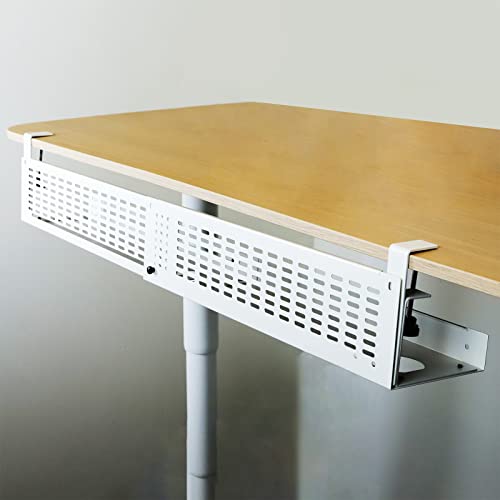
Easy to Use: Under-desk cable management tray with mounting clamp to secure it to the table (no drilling required, clamp up to 3” tabletop); Reversible mounting clamps make it easy to install in a variety of configurations
Desktop Cable Management Strategies
Often, a well-organized desktop can greatly enhance productivity. Effective cable management strategies include using clips to route cables along desk edges, preventing tangles and ensuring important connections are easily accessible. A cable sleeve can unify multiple cords, offering both an aesthetic appeal and protection against wear. Mounting power strips under the desk helps to eliminate visible clutter while keeping outlets conveniently accessible, improving the workspace’s overall look. Color-coded ties assist in categorizing cables, which aids in organization by distinguishing between power and data connections. Additionally, labeling both ends of each cable with durable tags simplifies troubleshooting and adjustments. It’s important to choose power strips with high energy absorption ratings to ensure the safety of your electronic devices and prevent potential damage from electrical surges. By implementing these strategies, one can create an efficient and visually appealing workspace that promotes productivity.
Recommended Products

FABRIC WIRE MANAGEMENT UNDER DESK: Premium fabric under desk cable organizer solution conceals cords and power strips. Fire-retardant and dust-resistant for safe, clean standing desk cable management tray. Elevate your setup with our cord management for under desk.
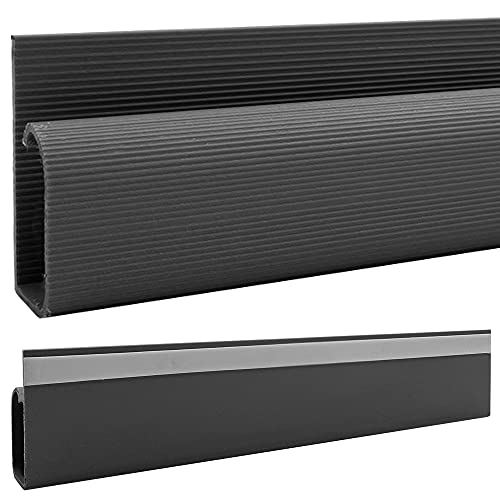
𝗗𝗜𝗠𝗘𝗡𝗦𝗜𝗢𝗡𝗦: 12"L x 2.3"H x 1.2"D | If you would like smaller pieces simply cut into desired length using a hacksaw
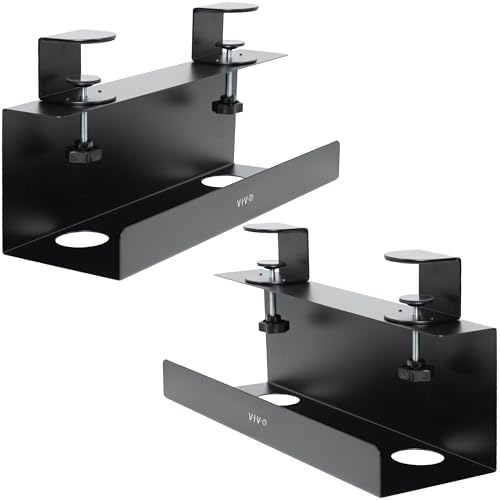
Clamp-on Power Strip Trays: Holds your surge protector off the floor, providing easy under-desk cable access. Heavy-duty C-clamps secure to desks up to 2" thick with simple hand tightening and include padding to protect your table from scratches
Integration of Cables With Monitors and Workspaces
Integrating cables with monitors and workspaces can greatly enhance productivity and organization. Effective cable management involves using adjustable monitor arms to route wiring, guaranteeing a clean visual appearance and preventing tangles. Proper placement of cables behind monitors supports airflow improvement, reducing device overheating and enhancing performance in compact workspaces. Utilizing grommets and sleeves on desks not only minimizes clutter but also maintains accessibility for adjustments. By organizing power and data cables separately, users can confirm signal integrity, vital for smooth operation. A well-structured cable system contributes to a professional appearance in workspaces, which fosters a focused environment. High-quality materials like PET and neoprene provide temperature resistance, ensuring protection and longevity for cables in a well-managed system. Clear cable management offers an essential step toward creating a functional workspace that boosts productivity and workflow efficiency.
Common Mistakes to Avoid in Cable Management
Maintaining an organized workspace is not solely about integrating cables with monitors; it also involves avoiding common mistakes in cable management. One critical error is overstuffing cable trays, which can lead to overheating and electrical failures. Additionally, failing to label cables hampers troubleshooting efficiency. Ignoring power safety can create fire hazards due to overloaded strips. Loose cables increase the risk of tripping and can cause tangling, resulting in wear and tear. Over-tightening cables can damage insulation, making reusable Velcro ties a safer choice. Proper cable organization prevents a cluttered desk and supports a more ergonomic setup. By being mindful of these common mistakes, individuals can enjoy a cleaner, safer, and more effective workstation. Chair mats, like those made from durable materials like PVC, also contribute to maintaining an organized and damage-free workspace by protecting floors and enhancing mobility.
Maintenance and Future Adjustments
Regular maintenance and future adjustments are fundamental for effective cable management. To maintain an organized workspace, regularly test all connected devices to guarantee functionality. This prevents potential downtime or disruptions. As new equipment is introduced or old devices are removed, planning periodic adjustments is essential for maintaining efficiency. Utilize additional cable clips or ties to secure any newly loose cables, eliminating tangles from equipment changes. Adhesive clips like XHF and 100 Pcs offer hassle-free user experiences with easy installation and residue-free removal, making them an ideal choice for maintaining a tidy setup. Establish a routine to review and tidy cable management systems, preventing disorganization from accumulating over time. Moreover, it is crucial to stay informed about new cable management products that enhance organization and safety. By adopting these practices, individuals can create a tidy and efficient workspace that adapts to evolving needs.
Benefits of a Tidy Workstation
A tidy workstation provides several benefits that extend beyond aesthetics. Organized cable management makes the workspace more organized and minimizes clutter. This leads to reduced distractions and a clearer focus, enhancing productivity by up to 20%. A clean workspace not only improves aesthetics but also reduces safety hazards, such as tripping hazards from tangled cables. Employees can navigate their desk safely, fostering a positive working environment. Additionally, maintaining order can reduce the time spent searching for items by 30%, supporting more efficient work processes. A well-kept workstation impresses clients and boosts employee morale. Durability of materials ensures longevity even in high-use environments, making it a crucial factor in maintaining a tidy workspace. For peak performance, regular management of cables and organization is essential. Invest in a tidy workspace to fully experience these advantages.
Frequently Asked Questions
How Often Should I Reorganize My Cables?
Out of sight, out of mind. Individuals should reorganize cables biannually, aligning with equipment upgrades or seasonal cleanup. By implementing effective organizational strategies, they enhance workspace efficiency and aesthetic choices, positively impacting productivity through regular maintenance schedules.
Can I Use Regular Ties Instead of Velcro® Ties?
Regular ties can be used as tie alternatives but may lack the adjustment ease and flexibility of Velcro ties. Consider cable durability, cost comparison, aesthetic considerations, and heat resistance for best usage scenarios.
What if I Have Too Many Cables to Manage?
Too many cables can overwhelm any workspace. Incorporating cable organization hacks, such as color coding and labeling, flexible cable sleeves, or creative hiding spots, offers effective cable storage solutions for multi-device setups, enhancing workspace decluttering.
Are There Specific Tools for Cable Cutting or Stripping?
Several tools exist for cable cutting and stripping, including handled cable cutters and automated cable strippers. Users should consider ergonomic design, safety features, and precision stripping methods to select the best cutting brands for durability.
How Can I Hide Cables in Plain Sight?
To hide cables in plain sight, one can use cable concealers, decorative boxes, under desk trays, wall-mounted racks, and hidden clips, alongside decorative ties, color-coded cables, and floor cable pathways for seamless integration.