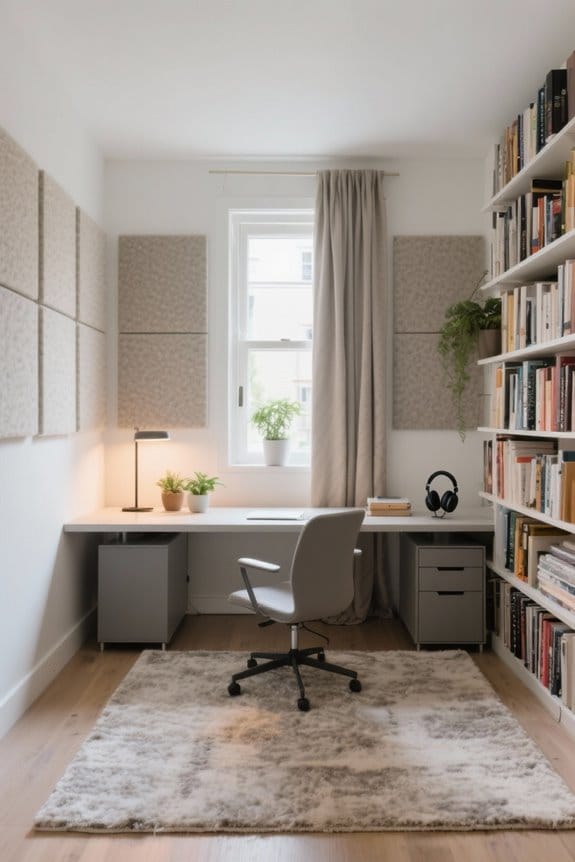
A multi-purpose workstation setup combines comfort and efficiency for work and gaming. It features an ergonomic desk that’s height-adjustable, promoting health by allowing users to alternate between sitting and standing. Assess the workspace layout to guarantee sufficient surface area for all equipment. Choose high-quality monitors with fast refresh rates for peak visuals. Organize cables effectively to reduce clutter. Incorporate ergonomic chairs to enhance comfort. Discover more about creating the ideal environment for productivity and enjoyment.
Key Takeaways
- Choose a height-adjustable desk to easily switch between sitting and standing for improved health and productivity during work and gaming.
- Ensure adequate surface area and ergonomic setups for monitors to facilitate efficient task management and immersive gaming experiences.
- Implement effective cable management solutions to reduce clutter and maintain a tidy workspace for both work materials and gaming gear.
- Invest in a high-quality ergonomic chair with lumbar support to enhance comfort and reduce strain during long hours of work or gaming.
- Create distinct zones for work and gaming items to establish clear boundaries and enhance focus during different activities.
The Importance of a Versatile Desk
A versatile desk is crucial for anyone who balances work and gaming. This setup allows for smooth shifts between tasks, enhancing both productivity and leisure. Height-adjustable desks offer flexibility, enabling users to alternate between sitting and standing, which promotes a healthier ergonomic setup. Proper organization is essential, ensuring that the desk remains clutter-free during work hours and provides an efficient space for gaming gear. Incorporating ergonomic accessories, such as monitor mounts and comfortable chairs, helps minimize physical strain. Additionally, a well-designed desk that combines aesthetics and functionality can improve workspace ambiance. An inviting area fosters creativity and motivation, benefiting both professional tasks and gaming activities. Many models support weight capacities up to 220 lbs, accommodating office and gaming equipment with stability and reliability. Prioritize a versatile desk to optimize your environment and enhance your experience.
Assessing Your Workspace for Dual Purpose

When evaluating a workspace for dual purposes, it is essential to contemplate both functionality and comfort. The physical size and layout are important for accommodating work and gaming equipment effectively. Make sure there is ample surface area for monitors, laptops, consoles, and peripherals to foster organization. Ergonomics plays a significant role; monitors should be positioned at eye level, and frequently used items must be within easy reach. Proper cable management through docking stations or organizers can help reduce clutter. Additionally, adequate lighting in the workspace is imperative. Good illumination enhances focus during work tasks and minimizes eye strain during gaming sessions. High-density foam padding supports the body and minimizes discomfort, optimizing the workspace to promote efficiency, allowing for a seamless shift between work and gaming activities.
Choosing the Right Monitor for Work and Gaming

How can one effectively choose a monitor that serves both work and gaming needs? A suitable monitor setup should feature a fast refresh rate of at least 120Hz and a low response time under 5ms for competitive gaming. Higher resolutions like 1440p or 4K enhance visuals for design work and gaming. Confirm the monitor supports HDMI 2.1 for compatibility with the latest consoles, providing advanced features like Variable Refresh Rate and Dynamic HDR. Screen size matters too; larger monitors, ideally 27 inches or above, improve productivity and immersion. Look for ergonomic positioning options to reduce neck strain. Ultimately, versatile connectivity options such as DisplayPort and USB-C enable seamless shifts between work and gaming tasks. Additionally, consider durable materials for long-lasting use and stability, as seen in the best gaming mouse pads of 2026.
Essential Cables and Connection Solutions

Choosing the right monitor is only part of creating a superior workstation setup for work and gaming. Essential cables play a significant role in optimizing performance. Investing in high-quality HDMI 2.1 cables enhances resolutions and refresh rates for smoother visuals during both work and gaming. A docking station with multi-screen support simplifies connections through a single USB-C cable, reducing clutter. This organization contributes to a cleaner workspace. Additionally, confirm all devices are compatible with Dynamic HDR and Variable Refresh Rate (VRR) features for better gameplay. Consider robust power strips with surge protection to safeguard your equipment. Finally, cable management solutions like clips and sleeves maintain a tidy workstation, supporting an efficient environment ideal for productivity and entertainment. For enhanced connectivity and charging options, consider investing in a Wenter 11-Port Hub, which provides multiple data ports and a dedicated charging port to manage several devices efficiently.
Creating a Comfortable and Ergonomic Chair Setup

A comfortable and ergonomic chair setup is essential for anyone working or gaming for long hours. Investing in an ergonomic chair, like the KaiChair, supports the spine’s natural curvature. This design reduces discomfort linked to prolonged sitting. Key features include adjustable height, lumbar support, and breathable materials, all important for enhancing long-term comfort. Many ergonomic chairs also offer reclining options that allow users to change positions easily, maintaining comfort during extended sessions. Proper lumbar support decreases the risk of long-term health complications, making it a crucial feature to consider. Proper adjustments to chair height and position are crucial. Users should frequently reassess their setup to avoid strain injuries. Ultimately, a well-designed ergonomic chair fosters improved focus and productivity, making it a valuable addition to any workstation for work or gaming.
The Benefits of a High-Capacity Standing Desk
High-capacity standing desks, like the Executive L-Shaped Standing Desk, offer numerous advantages for work and gaming environments. These desks can support up to 410 lbs, making them ideal for multiple monitors and gaming consoles. They promote better posture and help reduce health risks linked to prolonged sitting. The adjustable height settings cater to various user preferences, providing a comfortable experience for both work and gaming sessions. Additionally, a high-capacity standing desk provides ample surface area, allowing for better organization of work materials and gaming gear. Research shows that using standing desks can increase energy levels and lower fatigue, leading to improved focus and efficiency. Many smart plug brands, such as GHome and EIGHTREE, offer compatibility with home devices, enhancing the functionality of your workstation setup. Upgrading to a high-capacity standing desk can appreciably enhance productivity in any multi-purpose setup.
Optimizing Monitor Positioning With Mounts
Optimizing monitor positioning is a key factor in creating a comfortable and efficient workspace. Monitor mounts allow for adjustable positioning, which helps users achieve the ideal height, tilt, and orientation. This flexibility reduces neck and eye strain during long hours of work or gaming. Using monitor mounts also frees up valuable desk space, making them especially useful in a dual-purpose workstation setup. Many mounts support multiple screens, facilitating seamless multitasking between professional tasks and gaming. The ability to adjust monitors for ergonomic settings promotes better posture and reduces discomfort. Additionally, some mounts offer quick installation and VESA compatibility. Consequently, investing in monitor mounts enhances workspace functionality, offering both practicality and craftsmanship for any user. Adequate capacity promotes better organization of office essentials, ensuring that your setup remains stable and effective even with heavy equipment.
Lighting Considerations for Eye Care and Aesthetics
Lighting plays an essential role in creating an effective workstation for both work and gaming. Proper lighting considerations are crucial for reducing eye strain during long hours. The Screen Bar Halo offers features like “Real Time Auto Dimming” and three light modes, making it adaptable for various activities. Ambient lighting not only improves aesthetics but also creates a comfortable viewing environment, crucial for meetings and gaming sessions alike. Additionally, dynamic HDR lighting enhances color contrast, elevating visual experiences across tasks. Incorporating adjustable lighting mitigates glare and allows users to control brightness, supporting eye health during extended screen time. For a functional workstation, prioritize thoughtful lighting solutions that blend craftsmanship with ergonomic design, promoting both productivity and relaxation. Desk lamps with adjustable brightness settings offer customized lighting experiences, enhancing comfort and efficiency during diverse tasks.
Strategically Organizing Your Workspace
While establishing a productive workspace, one must consider the layout to effectively integrate areas for work and gaming. It is essential to designate specific zones to allow smooth shifts between these functions. Cable management solutions, such as docking stations, can help keep wires organized, ensuring a clean environment. A dual monitor setup enhances multitasking efficiency, with one screen dedicated to work tasks and another for gaming applications. Investing in ergonomic chairs and height-adjustable desks promotes comfort during long hours of work and gaming. Additionally, implementing dedicated storage solutions for gaming peripherals simplifies access depending on whether it’s work mode or gaming mode. Overall, strategic organization leads to enhanced focus and productivity in a multifunctional workspace. Incorporating breathable mesh panels into your storage solutions can also help keep items fresh and visible, adding another layer of organization and access efficiency.
Effective Clutter Management Techniques
Effective clutter management is crucial for maintaining an organized and efficient workspace that serves both work and gaming needs. Individuals can utilize cable management solutions like zip ties and sleeves to bundle and hide wires, reducing visual clutter in their desk setup. Implementing drawer organizers or storage boxes helps keep gaming accessories, work supplies, and peripherals neatly stored yet easily accessible. Creating designated zones for work and gaming items guarantees that each area remains clutter-free and functional. Regularly decluttering the workspace by removing unneeded items also aids in organization. Additionally, using a docking station allows connection of multiple devices with a single cable, minimizing visible wires and enhancing the clean aesthetic of the desk setup. Under desk cable trays are an effective solution for managing and organizing cables beneath the workstation, promoting a tidy environment and preventing safety hazards.
Enhancing Productivity With the Right Equipment
Investing in quality equipment is vital for enhancing productivity and the gaming experience. A high-resolution monitor can improve visuals and multitasking capabilities in a home office setup. Fast refresh rates and minimal input lag are essential for competitive gaming, allowing for smoother gameplay. A dual-monitor setup improves workflow by allocating one screen for work tasks and another for gaming or communication. This reduces application-switching and boosts efficiency. Effective cable management, such as using docking stations, organizes the workspace, minimizing distractions. Additionally, ergonomic accessories like adjustable chairs and monitor mounts guarantee comfort and proper posture. These elements promote longer, healthier work and gaming sessions, enhancing overall productivity and enjoyment. Investing wisely is fundamental for achieving the best workstation experience.
Tips for Maintaining Work-Life Balance
To maintain a healthy work-life balance, it is essential for individuals to set clear boundaries between work and leisure activities. Establishing designated work hours and gaming periods helps prevent overlap, fostering a healthier routine. Visual or auditory cues, such as timers, can signal shifts from work to gaming, enhancing focus and relaxation. Regular breaks during both work and gaming reduce fatigue and help prevent burnout, optimizing productivity. Additionally, a clutter-free workspace minimizes distractions, creating a serene environment for tasks. Engaging in physical activity during breaks boosts health and well-being, offsetting the sedentary nature of work and gaming. By implementing these strategies, individuals can effectively maintain a sustainable work-life balance that supports both professional and personal fulfillment.
Frequently Asked Questions
What Peripherals Are Essential for an Optimal Workstation Setup?
Essential peripherals for an ideal workstation setup include high-quality input devices like a mechanical keyboard and an ergonomic mouse, which enhance productivity and comfort. Additional monitors and a reliable headset further improve the overall user experience.
How Can I Balance Work and Gaming Time Effectively?
Effective time management can be achieved by setting specific schedules for work and gaming. Prioritizing tasks, using timers, and establishing breaks allows individuals to maintain a healthy balance, optimizing productivity and enjoyment in both areas.
Are There Specific Accessories for a Gaming-Friendly Desk?
A gaming-friendly desk is like a well-tuned orchestra; specific gaming accessories such as ergonomic chairs, mechanical keyboards, high-refresh-rate monitors, and efficient cable management elevate both function and enjoyment, creating an ideal environment for productivity and leisure.
What Is the Ideal Distance Between Monitors and My Eyes?
The ideal distance between monitors and eyes is generally 20 to 30 inches. Proper monitor positioning enhances visual comfort, reducing eye strain while promoting effective focus for both work and gaming tasks. Adjust accordingly for individual preference.
How Do I Maintain My Equipment for Longevity?
Maintaining equipment for longevity involves regular cleaning, appropriate storage, and timely updates. Proper cable management and using anti-surge protection also contribute to equipment care, preventing damage caused by dust, moisture, or electrical surges.