


Organizing cables under the desk without tools is straightforward. First, unplug and evaluate all cables, grouping them by type. Next, gather supplies such as adhesive cable clips and Velcro ties. Use adhesive clips to secure cables along desk edges for easy access. Bundle cords with Velcro ties to prevent tangling. Organize cables behind the desk for a neat appearance. Maintain flexibility for adjustments to accommodate new devices. Learn more about enhancing your workspace’s functionality and aesthetics.
Key Takeaways
- Use adhesive cable clips to secure and organize cables along the underside of your desk without the need for drilling or tools.
- Bundle cables with Velcro straps for easy adjustments and to prevent tangling, ensuring a tidy space.
- Implement cable sleeves to conceal excess wires, creating a clean and streamlined appearance under your desk.
- Utilize a power strip with USB ports to centralize connections and enhance accessibility without complex installations.
- Regularly inspect and reposition cable management supplies to adapt to changes in your workspace and maintain a tidy environment.
Unplug and Evaluate Your Cables
To begin organizing cables under the desk, one must unplug all devices. This action allows for a thorough evaluation of the cables present. By laying out all cords in a designated area, it becomes easier to assess their lengths and conditions. Identifying excess or damaged cables for disposal improves the overall organization and guarantees a cleaner look. Grouping similar-looking cables, such as power and data cords, will simplify reconnecting devices and decrease confusion. During this process, measuring the necessary lengths helps minimize slack, reducing clutter. For easy adjustments, using adhesive clips and cable ties provides a simple, no-tool solution, effortlessly keeping cords bundled and organized. This method not only enhances functionality but also promotes an aesthetically pleasing workspace. Cable management boxes(Cable management boxes) can further help conceal power strips and cords, maintaining a tidy and safe environment.
Gather Your Supplies

Before beginning the organization process, it is crucial to gather the right supplies. Start with cable clips, which help secure wires in place. Velcro straps are useful for bundling cables together while allowing adjustments if needed. A power strip guarantees easy access to multiple outlets. Choose adhesive cable clips that stick to surfaces without drilling for effortless attachment. A cable tray can hold excess cables and power strips neatly under the desk. Also, collect reusable cable ties to manage various cord lengths effectively. Finally, make sure to have labels or tape ready for marking cables clearly. Most options emphasize hassle-free installation with no drilling required, ensuring a safer workspace by reducing tripping hazards. These supplies will help organize cables efficiently, creating a cleaner and more functional workspace.
Recommended Products

FABRIC WIRE MANAGEMENT UNDER DESK: Premium fabric under desk cable organizer solution conceals cords and power strips. Fire-retardant and dust-resistant for safe, clean standing desk cable management tray. Elevate your setup with our cord management for under desk.


Keeps cords and power supplies organized and hidden from view
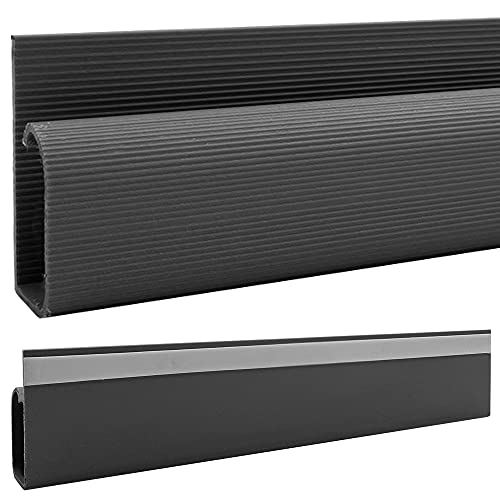
𝗗𝗜𝗠𝗘𝗡𝗦𝗜𝗢𝗡𝗦: 12"L x 2.3"H x 1.2"D | If you would like smaller pieces simply cut into desired length using a hacksaw
Sort Cables by Type

Sorting cables by type greatly enhances workspace organization. By sorting cables into categories like power, USB, and audio, individuals facilitate easier management and quick access. This method prevents tangling and helps reduce clutter commonly found with mixed cords. Organizing cables based on function streamlines workflow, allowing for more efficient setups and troubleshooting. A well-structured cable management system not only improves accessibility but also maintains a tidy workspace over time. Using color-coded Velcro ties or cable labels can enhance organization, providing clear visibility for specific cords. Establishing a consistent sorting system encourages good practices and minimizes the need for frequent reorganization. This approach exemplifies craftsmanship and promotes sustainable workspace solutions. Consider implementing these strategies for a more efficient environment. Moreover, under desk cord organizers are designed to improve workspace aesthetics by reducing cable clutter, ensuring an organized and efficient setup.
Use Adhesive Cable Clips

An organized workspace goes beyond sorting cables by type. Adhesive cable clips represent a simple, no-tools solution for organizing cables under the desk. They provide secure mounting on various surfaces and come in different sizes to accommodate multiple cable types. This feature allows for customizable organization, tailored to individual needs. Many adhesive clips offer strong backing, ensuring reliable adhesion that prevents cable tangling and drooping. By maintaining a clean workspace, these clips support effective cable management and can markedly enhance productivity. Additionally, their easy repositioning does not damage surfaces, making them ideal for frequently changing desk setups. Consider incorporating adhesive cable clips to streamline your workspace and maintain an efficient environment. Open structure designs in cable trays can further enhance cable management by promoting airflow and easy access.
Recommended Products


Fixing cables up to a diameter of 8 mm.

Fixing cables up to a diameter of 8 mm.

Fixing cables up to a diameter of 8 mm.
Bundle Cables With Velcro Ties

Bundling cables with Velcro ties creates an efficient and organized workspace beneath desks. These adjustable and reusable ties are perfect for organizing cords without the need for tools. Available in various sizes and colors, Velcro ties can easily group cables by type or function, enhancing organization further. By bundling excess cable lengths, users can maintain a clean and neat appearance, which prevents tangling. Additionally, Velcro ties help reduce cable clutter, minimizing tripping hazards and creating a visually appealing setup. Their design allows for simple detachment and repositioning, making updates to cable management easy. For a sustainable solution to workspace organization, Velcro ties prove to be a strong option in the quest for a tidy work environment. Consider using acrylic business card holders to complement your organized workspace, as they offer durability and clear visibility for professional settings.
Recommended Products


Designed for small cables such as USB adapter cables for mobile phones and earbud cords for portable music players

Label Each Cable
Organized cables contribute greatly to an efficient workspace. Labeling each cable at both ends aids in the identification of devices and simplifies the process of connecting and disconnecting them. Use pre-printed or customizable labels to provide clear descriptions of each cable’s purpose. This helps reduce confusion during setup and troubleshooting. Color-coded labels improve organization, allowing users to categorize cables by type or destination, making it easier to navigate multiple connections. Regularly updating this labeling system as equipment changes will help maintain clarity and minimize clutter over time. Incorporating a labeling strategy into cable management can save time and reduce frustration, especially in intricate setups. Take steps now to streamline your workspace. Additionally, consider the weight capacity considerations of your desk to ensure that your cable management solutions do not inadvertently affect its stability and functionality.
Create a Charging Station
Creating a dedicated charging station under the desk can streamline the management of electronic devices. Designate a specific area that remains accessible and organized. Use adhesive clips to secure charging cables alongside the desk for easy access. Incorporate a power strip equipped with USB ports to centralize charging for multiple devices without requiring additional wall outlets. This approach not only enhances functionality but also keeps cables secure and tangle-free. Additionally, utilize cable sleeves to bundle and conceal excess charging cables, maintaining a clean appearance underneath the desk. Label each cable leading to the charging station for quick identification. This organized system promotes efficient cable management, making it simple to locate and charge devices whenever needed. Ensure that the power strip you choose has high energy absorption ratings to protect your devices from electrical spikes and surges.
Recommended Products

Adjustable Height - Achieve a healthier workstyle with our electric standing desk, smoothly adjustable from 28" to 43" to perfectly fit your sit-stand routine.Four programmable memory buttons allow you to instantly return to your preferred sitting and standing heights.The powerful dual-motor lifting system operates quietly at under 50 dB, ensuring a distraction-free environment for focused work or calls.

[2-in-1 Pull Out Sleeper Sofa Bed] Instantly transform your living room with our heavy-duty hidden pull out couch bed. Hosting overnight guests is a breeze. Accommodates adults comfortably, ending the struggle of flimsy air beds for good.

Multifunctional Power Recliner--This recliner sofa set is controlled by the buttons built inside the armrest. You can smoothly adjust the footrest and back to your preferred reclining position.
Utilize Desk Edges for Routing
A dedicated charging station helps streamline cable management, but implementing an effective routing system additionally enhances workspace organization. Utilizing desk edges for organizing your cables offers an efficient way to maintain a tidy workspace. By using adhesive cable clips or command hooks, individuals can quickly secure cables along desk edges. This simple method allows for easy access to frequently used cables, promoting efficient connections. Additionally, routing cables along the edges minimizes clutter and reduces the risk of tripping hazards, enhancing safety in the workspace. The result is a clean aesthetic that conceals and organizes cables, improving the overall appearance. Adhesive cable clips, like XHF clips, offer strong adhesion and are perfect for managing USB, Ethernet, and TV cables. Adopting this technique not only promotes cable organization but also contributes to a more functional and appealing environment.
Organize Cables Behind the Desk
Maintaining a clutter-free environment is essential for productivity, especially when it comes to organizing cables behind the desk. Start by unplugging and sorting through cables to eliminate unnecessary wires. This simple step helps to keep everything neat and manageable. Utilize adhesive strips or hooks to secure cables along the back of the desk, promoting a clean appearance and efficient cord management. A cable management tray can be beneficial for bundling cords together, while a mounted power strip centralizes connections, minimizing visible clutter. Regular evaluation of the cable organization guarantees it adapts to any changes in devices. For effective desk cable management, consider these methods to keep cables organized and your workspace professional. To further enhance the workspace, consider using a noise reduction capability office chair mat to create a quieter and more productive environment.
Maintain Flexibility for Adjustments
Flexibility in cable management is essential for adapting to changes in technology and workspace design. To maintain flexibility, bundling cables with Velcro straps allows for easy adjustments as new devices are introduced. Utilizing cable clips or adhesive hooks that can be repositioned helps organize loose cables without damaging desk surfaces. Choosing cable sleeves that facilitate modular changes makes it simple to add or remove cables, thereby ensuring seamless organization. Additionally, implementing a mountable power strip permits repositioning as space usage requires. This proactive approach enhances the organization process and accommodates future tech upgrades effectively. Businesses should prioritize such flexible solutions in their cable management systems to foster efficient workspaces. Selecting cable management sleeves made from high-quality materials that offer temperature resistance and durability can also play a crucial role in maintaining an organized and safe environment.
Regularly Check Cable Management
Effective cable management requires not only initial organization but also regular maintenance to confirm lasting functionality. Individuals should regularly check their cable organization to identify potential hazards like tangled cables or overheating caused by worn-out cords. Inspect cable ties and clips to verify they secure cables without damage due to excessive tightness. Periodic reviews help adapt to new devices, maintaining a tidy workspace. Testing cables during each check ensures proper connectivity, saving time and avoiding frustration. Implementing a checklist for cable management aids in tracking maintenance schedules, promoting responsiveness to issues. By prioritizing regular inspections, users enhance their workspace’s ergonomics and sustainability while confirming the craftsmanship of their cable setup remains intact. A proactive approach benefits all users.
Frequently Asked Questions
How Do You Organize Cables Under Desk?
To organize cables under a desk, one can implement effective cable management solutions like using cable clips, creating DIY cable hideaways, and employing under-desk cable boxes, ensuring a minimalistic desk design while avoiding tangles with aesthetic cable covers.
How Do Interior Designers Hide Cords?
Interior designers effectively hide cords using decorative solutions like color-coordinated cord covers and cable concealers. They often utilize adhesive strips, custom furniture, and strategic furniture layout to achieve aesthetic organization for multi-device charging.
How to Hide Extension Cord Under Desk?
To hide an extension cord under a desk, consider adhesive cable clips, under-desk hooks, and decorative cable covers. Implement cord management tips like proper power strip placement and cable sleeve ideas for an organized workspace.
Are Cable Trays Worth It for Desks?
Cable trays are worth it for desks, like a hidden treasure that enhances desk aesthetics and workspace efficiency. They provide cable management benefits, reduce cord visibility, and create a clutter-free environment compared to adhesive cable clips.


