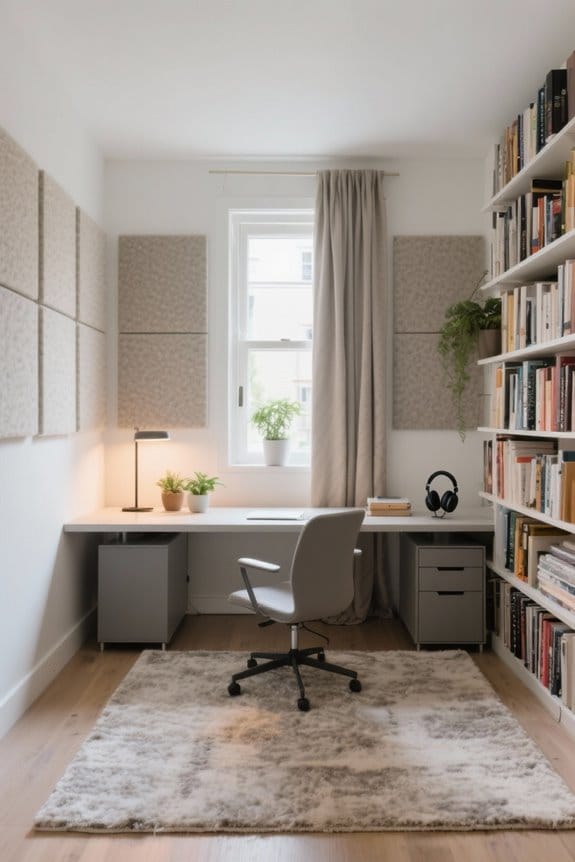
For an effective shared workstation setup for two, focus on layout and ergonomics. Position desks back-to-back or side-by-side to enhance personal space and minimize distractions. Choose ergonomic chairs with lumbar support and adjustable features for comfort. Manage noise with quiet hours and soundproofing measures. Guarantee reliable internet connectivity with a central router and consider personalizing each workspace for motivation. A cohesive design will harmonize the environment. Discover additional tips for enhancing productivity and comfort.
Key Takeaways
- Arrange desks in a back-to-back or side-by-side configuration to maximize personal space and minimize distractions.
- Implement privacy panels to define boundaries and create distinct work zones for better focus and collaboration.
- Invest in ergonomic chairs and adjustable desks to ensure comfort and promote healthy work habits during long hours.
- Set clear noise management strategies, like designated quiet hours and headphones, to enhance productivity and reduce interruptions.
- Personalize workspaces with decor and plants to foster an inspiring environment while maintaining organization with desk storage solutions.
Getting the Layout Right
When setting up a shared workstation, choosing the right layout is essential for productivity. A smart approach includes positioning desks against opposite walls or in a back-to-back configuration. This setup fosters personal space and minimizes distractions. For effective layout planning, side-by-side desk arrangements with a gap are preferred over face-to-face setups, as they reduce awkward interactions. Each workstation must have essential tools and organized storage to create a functional environment. Incorporating cable management solutions, like under-desk trays, supports a clutter-free workspace and enhances aesthetics. Additionally, optimizing pathways guarantees comfortable workflow for both individuals. By thoughtfully designing the shared workspace for two people, enhanced focus and efficiency can be achieved, promoting a productive atmosphere. Monitor arm wall mounts can further optimize space by lifting screens off the desk, contributing to an organized and ergonomic environment.
Defining Separate Workspaces

Defining separate workspaces within a shared office is crucial for maintaining productivity. Each person should have a dedicated desk that prioritizes ergonomic design and supports their workflow. Personal storage solutions are important for organizing belongings, minimizing clutter, and maintaining a clean workspace. Additionally, incorporating distinct visual elements, like personalized decorations or color schemes, reinforces individual identity and promotes creativity. It is essential to define boundaries, perhaps with privacy panels, to respect individual space while facilitating collaboration. This setup not only creates a productive workspace but also enhances comfort. Investing in these strategies guarantees both individuals can thrive in a shared space, increasing overall efficiency and satisfaction. Creating distinct zones helps everyone work better together. Consider selecting L-shaped designs for corner spaces to optimize the use of limited space while providing ample room for each person’s work needs.
Choosing Ergonomic Chairs

Creating separate workspaces is a starting point for enhancing productivity. Choosing ergonomic chairs is vital for a shared workstation. These chairs should feature lumbar support and adjustable seat height to meet individual comfort needs. Properly designed chairs can help prevent musculoskeletal disorders by promoting good posture during long hours of work. Users should prioritize breathable fabric and sufficient padding to guarantee comfort while sitting. Testing chairs for fit is important, as non-ergonomic options may lead to discomfort and decreased focus. Investing in high-quality ergonomic chairs tailored to specific requirements not only fosters a productive environment but also supports long-term health. ergonomic chairs significantly improve comfort levels during work, helping to create a more efficient shared workspace. Make ergonomic choices a priority to foster a comfortable and efficient workspace.
Managing Noise and Distractions

How can individuals effectively manage noise and distractions in shared workspaces? To enhance productivity, utilizing noise-cancelling headphones can help minimize interruptions from a partner’s activities. Implementing defined scheduling for meetings and collaborative tasks will reduce disruptions, allowing both individuals to focus when needed. Additionally, establishing visual cues, such as wearing headphones or adjusting lighting, can communicate when one person is in work mode and prefers limited interruptions. Soundproofing measures, such as using rugs and heavy curtains, can further diminish noise transfer between workstations. Together, these strategies create an environment conducive to concentration. By investing in these simple techniques, individuals can foster a more effective shared workspace that promotes productivity while minimizing distractions.
Recommended Products
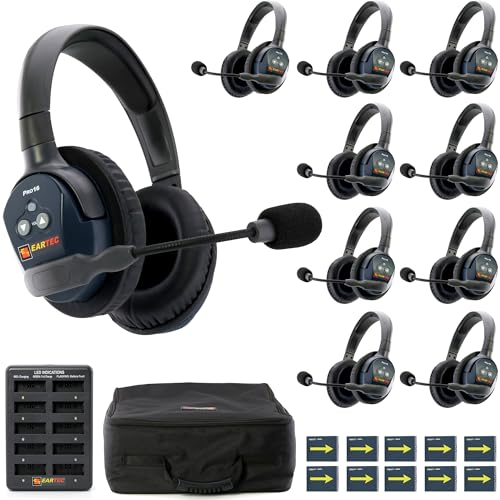

WIRELESS CREW COMMUNICATION FOR 10, SCALABLE TO 16: Keep a 10-person team talking hands-free across up to half a mile. Full duplex means everyone speaks and listens at the same time — no push-to-talk button, no waiting your turn. Add more headsets later; PRO16 expands to 16 users without a hub or base station.

TEN-PERSON HANDS-FREE INTERCOM, EXPANDS UP TO 16: Keep a team of ten in conversation across distances up to half a mile. Full-duplex audio lets every member talk and listen simultaneously — no button to press, no taking turns. Need more later? Add up to 6 more PRO16 headsets without a hub or central control unit.

WIRELESS CREW COMMUNICATION FOR 8, SCALABLE TO 16: Keep an 8-person team talking hands-free across up to half a mile. Full duplex means everyone speaks and listens at the same time — no push-to-talk button, no waiting your turn. Add more headsets later; PRO16 expands to 16 users without a hub or base station.
Establishing Quiet Hours

Establishing quiet hours in shared workspaces promotes an atmosphere of concentration and productivity. Clear communication between users is essential; they should agree on specific times when meetings and high-volume tasks are avoided. This respect enhances focused work and minimizes distractions. Utilizing a shared calendar can effectively mark these designated quiet hours, promoting harmony in personal work zones. Additionally, visual cues, like noise-cancelling headphones, signal when someone is in a quiet hour, further decreasing interruptions. Regularly revisiting and adjusting the schedule guarantees it remains effective for both individuals. Ultimately, implementing structured quiet hours is a practical approach that fosters a collaborative and efficient workspace, benefitting everyone involved and enhancing overall productivity. Additionally, ergonomic features such as adjustable height and tilt options in your workstation setup can further improve comfort and efficiency during these designated quiet hours.
Organizing Storage Solutions
A well-organized workspace enhances productivity and reduces stress. Effective organizing storage solutions are essential in a shared workspace. Incorporating dedicated storage solutions, like individual cabinets or shelves, helps separate personal items and reduce clutter. Using desktop organizers allows easy access to frequently used items, maintaining an efficient workstation. Implementing color-coded storage solutions can streamline organization. This makes it simpler to identify each user’s items and their proper return locations. Dividing closet space for shared goods and creating designated areas for personal supplies provide adequate storage and minimize conflict. Finally, maximizing vertical space with floating shelves keeps important materials off desktops, fostering a more spacious and inviting environment. Each of these strategies contributes to a harmonious shared workspace. Additionally, choosing ergonomic designs with appropriate height and legroom enhances comfort and improves overall workspace satisfaction.
Selecting Appropriate Lighting
Selecting the right lighting is essential for a shared workspace. A combination of natural light and adjustable artificial lighting minimizes glare while creating a comfortable atmosphere. Workstations should be positioned near windows to maximize natural light, as this can boost mood and productivity. It is important to avoid direct sunlight on screens. Desk lamps with adjustable brightness allow individuals to cater to personal preferences without interrupting each other’s workflow. Additionally, smart lighting systems can enable users to control intensity and color temperature, enhancing the work environment. Incorporating floor lamps with adjustable heads offers further illumination for various tasks, ensuring well-lit areas for reading or computer work. Prioritize sustainable and ergonomic solutions for an ideal shared experience. Many LED desk lamps offer customizable lighting options, allowing users to adjust the color temperature and brightness levels to suit different activities, further enhancing productivity and comfort.

Recommended Products

PIR occupancy sensor automatically turns the unit off when not in use, and back on when the user returns

Lower head diffuser in thermoplastic

Intelligent lighting in multiple formats. Adapts and transforms with your day.
Setting up the Tech Environment
Creating an efficient tech environment is vital in a shared workstation. Both individuals should have access to ergonomic chairs and quality monitors to guarantee comfort during long work hours. Establishing a centralized tech infrastructure is key. This includes placing common items like printers and routers in a shared area for easy accessibility. Scheduling quiet hours can help minimize disruptions during video calls and other tasks. Utilizing noise-canceling headphones can further enhance focus, allowing each person to concentrate effectively. By planning the layout and equipment carefully, the office becomes more organized and functional, promoting productivity. Adjustable height desks enhance work experience by allowing users to switch between sitting and standing, providing ergonomic benefits tailored to each individual’s needs. Implement these tips to create a supportive and collaborative shared workstation that meets both users’ needs efficiently.
Ensuring Internet Connectivity
Reliable internet connectivity plays an essential role in the efficiency of a shared workstation. To guarantee this, consider upgrading to a higher broadband plan that accommodates multiple users. Using Ethernet connections instead of relying solely on WiFi can enhance stability, reducing latency and dropped calls. It is important to position the WiFi router centrally to maximize signal strength and minimize dead zones. If the room is larger, implementing mesh networks or WiFi extenders can provide robust coverage for both users. Regular speed testing is vital to monitor internet performance and identify issues swiftly. By taking these steps, individuals can maintain peak connectivity, facilitating seamless collaboration in a shared workspace. Utilizing quick-drying and mold-proof materials in the workspace design can also support a hygienic environment, preventing unwanted issues such as mold growth.
Personalizing Individual Work Areas
Personalization of individual work areas can greatly enhance productivity and satisfaction in a shared workstation. By personalizing each workspace with unique decor, such as framed photos and colored peripherals, individuals can create an identity that reflects their style. Clear delineation of spaces is essential; using decorative dividers or color-coded accessories prevents overlap and maintains order between workstations. Each person should select functional organizational tools, like personalized desktop organizers, to keep essentials easily accessible and clutter-free. Additionally, incorporating personal achievements and artwork fosters an inspiring atmosphere and promotes a sense of ownership. Encouraging these practices leads to a more effective and enjoyable work environment, where each individual can thrive in their personalized space. Utilizing mesh desk organizers with multiple compartments can also help maintain a tidy and stylish workspace, enhancing functionality and productivity.
Incorporating Plants and Decor
Incorporating plants and decor into a shared workstation can considerably enhance both functionality and aesthetics. Plants improve air quality and boost mood, increasing productivity and reducing stress for both individuals. Selecting low-maintenance varieties, like succulents or snake plants, allows easy care without disrupting routines. Decor elements, such as framed artwork or personalized items, visually distinguish each person’s workspace, promoting ownership in the shared environment. Complementary color schemes in decor create a cohesive design, harmonizing individual styles while supporting collaboration. Additionally, decorative items like bookshelves or floating shelves can serve as storage solutions while showcasing personal interests. This thoughtful integration of plants and decor fosters an inviting workspace that motivates individuals to excel together.
Creating a Cohesive Design
Creating a cohesive design in a shared workstation enhances both aesthetics and functionality. Selecting identical styles for desks promotes a unified aesthetic that is visually appealing. A consistent color palette across furniture and decor elements contributes to a calming work environment. Incorporating shared decorative elements, such as plants or artwork, strengthens the sense of partnership and collaboration between users. Additionally, ensuring that storage solutions match in style and finish maintains an organized look throughout the office. Balanced lighting, achieved through similar desk lamps or uniform window treatments, reduces glare and offers consistent brightness. By focusing on these aspects, the shared workspace can achieve a cohesive design that elevates productivity and comfort for both individuals.
Frequently Asked Questions
How Do We Handle Conflicting Schedules in a Shared Workspace?
To handle conflicting schedules in a shared workspace, they employed schedule negotiation techniques, time blocking strategies, and communication tools. Calendar sharing apps, priority setting methods, flexible work hours, and quiet time signals enhanced collaboration etiquette.
What Are the Best Ways to Promote Teamwork in Our Setup?
Studies show that 70% of successful teams engage in team bonding. Promoting teamwork involves collaborative projects, joint brainstorming, and open communication. Encouraging similar routines and mutual respect, alongside fun activities, strengthens shared goals and relationships.
How Can We Balance Personal and Shared Space Effectively?
Balancing personal and shared space involves establishing productivity zones, implementing noise management strategies, utilizing privacy solutions, incorporating shared decor with complementary color schemes, and promoting effective communication tools while allowing for schedule flexibility to enhance collaboration.
What Budget-Friendly Options Are Available for Shared Workstations?
What if a workspace could thrive on simplicity? Budget-friendly options include DIY desk solutions, minimalist furniture, secondhand equipment, mobile storage options, budget organizers, ergonomic accessories, shared stationery, and flexible lighting to maximize efficiency.
How Do We Resolve Disputes Over Workspace Boundaries?
Disputes over workspace boundaries can be resolved through effective communication strategies, establishing designated zones, and mutual agreements. Upholding workspace etiquette and respectful behavior, along with regular feedback sessions, promotes conflict resolution and reinforces personal boundaries.