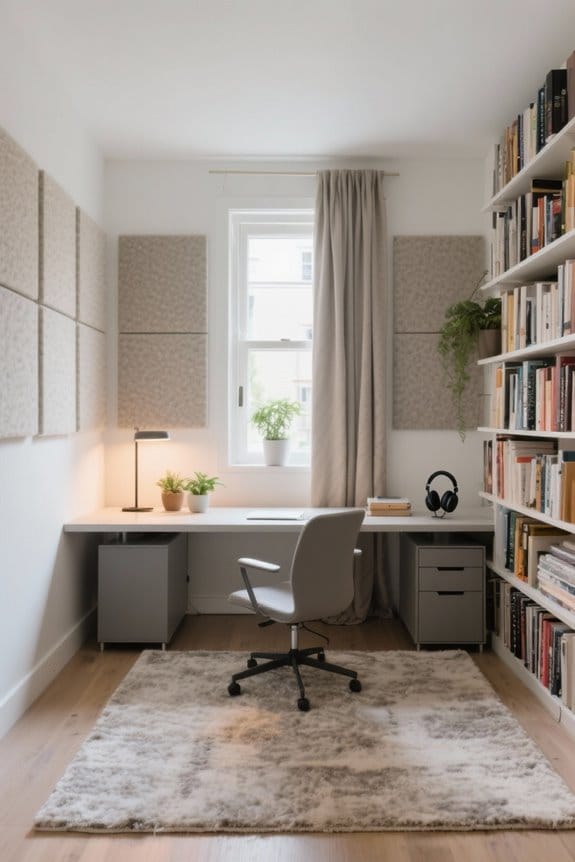
Setting up a healthy home workstation involves several key steps. First, assess your space to guarantee it fits ergonomic furniture, allowing smooth movement and proper lighting. Next, choose an ergonomic chair with lumbar support and adjustable features. Adjust your desk height for ideal monitor placement, maintaining eye-level alignment. Confirm the keyboard and mouse are positioned comfortably for typing. Finally, incorporate sustainable accessories and establish regular breaks for movement. This guide will help create an efficient environment conducive to productivity.
Key Takeaways
- Measure the workspace area to ensure adequate room for furniture and movement, fostering a comfortable and organized environment.
- Choose an ergonomic chair with lumbar support and adjustable features for optimal posture during extended use.
- Position the desk and monitor at appropriate heights to maintain a 90-degree elbow angle and reduce eye strain.
- Incorporate regular breaks and movement into your routine to enhance productivity and maintain physical well-being.
- Create a positive workspace atmosphere with sufficient lighting, clutter-free organization, and UV protection for valuable items.
Assessing Your Space for Optimal Setup
When evaluating a space for ideal workstation setup, it is crucial to start by measuring the available area. This guarantees the chosen furniture fits comfortably while preventing overcrowding. A spacious workspace allows for smooth movement, which is essential for an ergonomic setup. Next, assess the lighting conditions; natural light boosts mood and energy levels but requires careful placement of the workstation. Consider privacy needs as well, as a secluded workspace can greatly enhance productivity. Using dividers may help in creating this environment. Additionally, plan the layout so that frequently used items are easily accessible, minimizing strain. A thoughtful approach to space assessment ultimately supports a healthier and more efficient workspace. Adding compact designs such as pen holder cups can help maintain an organized desk environment while maximizing space efficiency.
Choosing the Right Ergonomic Chair

Choosing the right ergonomic chair is vital for creating a healthy workstation. An effective ergonomic chair provides lumbar support to help maintain the natural curve of the spine, reducing the risk of chronic back pain. It’s important that the chair height allows the feet to rest flat on the floor, with thighs parallel to the ground, promoting proper circulation and comfort during long hours of sitting. Additionally, armrests should be positioned for the arms to rest comfortably, minimizing shoulder strain. Prioritize chairs with adjustable features, like seat depth and backrest angle, to guarantee an ideal fit. A well-fitted ergonomic chair promotes relaxation in the shoulders, enhancing overall comfort and productivity for users. Considering the adjustable height desks can also contribute to a healthier workstation by allowing users to switch between sitting and standing, further enhancing comfort and productivity.
Recommended Products

The curved design of the wide wooden handrail firmly supports the arm.


[High-Back Ribbed Design] The high-back design promotes good posture, offering essential support for your lumbar and upper back. Ribbed detailing on the seat and backrest enhances breathability and adds stylish texture, while the soft-padded armrests provide extra comfort, making it an ergonomic choice for long hours at the desk.

[MODERN DESIGN WITH EXECUTIVE STYLE] Sleek and professional, this ergonomic office chair enhances any home office, executive suite, or conference room. A perfect blend of style and function for modern workspaces.
Adjusting Your Desk Height and Position

Adjusting desk height and position is crucial for achieving an ergonomic workstation. To maintain a proper ergonomic setup, individuals should verify their elbows are at a 90-degree angle when typing. This enables hands to rest comfortably on the keyboard. If the desk height is fixed, raising the chair and using a footrest can help achieve the correct leg positioning, keeping thighs parallel to the floor. Adequate legroom under the desk is also essential, as it prevents obstructions that hinder good posture. Regular assessments of the desk position should be made to accommodate any workspace changes. Prioritizing desk height and alignment contributes to a healthier workstation setup, enhancing comfort and productivity in day-to-day tasks. It is important to consider future equipment growth when setting up your workspace to ensure that any additional items can be accommodated without compromising ergonomics.
Recommended Products

[COMFORT FOR ADULTS] Designed for fully grown adults who want true ergonomic support during movies gaming and daily relaxation, this heavy duty recliner chair features a spacious 22 inch seat width paired with a supportive 26 inch tall backrest for improved posture and full body comfort. The extended 67.5 inch full recline length allows complete head to toe relaxation while supporting up to 350 lbs per seat. Whether used as home theater seating a living room chair or a lounge chair this power recliner loveseat delivers spacious comfort beyond a standard loveseat sofa or traditional couch.

As an affiliate, we earn on qualifying purchases.

[COMFORT FOR ADULTS] Experience premium relaxation engineered specifically for fully grown adults. This heavy duty recliner chair features a spacious 22 inch seat width, a supportive backrest, and an overall 43.5 inch height designed to promote proper posture and full body comfort. The extended 66.5 inch recline depth allows complete head to toe relaxation while supporting up to 350 lbs per seat. Whether used as home theater seating, a living room chair, or a lounge chair, this power recliner loveseat delivers exceptional comfort beyond a traditional couch or loveseat sofa.

【P2.5 Flexible LED Screen】Equipped with a flexible LED screen with P2.5 pixel pitch, it has good high-definition display effect, with vivid, delicate and full-color images. It can adapt to various brand promotions, event promotions and dynamic content display, attract the attention of passers-by and enhance the overall texture of the venue.
Proper Monitor Placement for Eye Health

Proper monitor placement is essential for maintaining eye health and overall comfort in a home workstation. To minimize eye strain, position the monitor approximately 20 to 40 inches away from the eyes. The top of the monitor screen should rest at or slightly below eye level. This prevents neck and shoulder discomfort from awkward positioning. Bifocal users should lower the monitor an additional 1 to 2 inches to guarantee a natural line of sight. Align the monitor directly in front to reduce neck twisting, which can lead to muscle strain over time. Additionally, adjust monitor angles to minimize glare from windows or overhead lights, reducing eye fatigue and enhancing overall viewing comfort. When setting up your workspace, consider using a mesh back office chair to enhance ergonomic support and maintain comfort during extended periods of work.
Recommended Products

Dual-monitor compatibility: Fits two screens up to 24 inches diagonal and 4.5 to 10 pounds each; compatible with VESA patterns 75x75mm and 100x100mm

Effortless Electric Adjustment - Transition smoothly from sitting to standing with the Techtonic's quiet, button-operated height adjustment. Perfect for gaming or computer work without manual lifting.
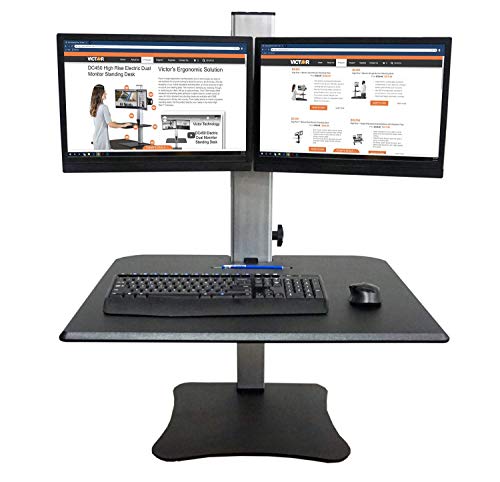
CONVERT YOUR DESK INTO A STANDING DESK - The DC350A fits on top of a current desk or cubicle space, using a padded steel plate for stability and protection of the underneath desk surface. No clamping, mounting, or bolting necessary.
Configuring Keyboard and Mouse Position

Configuring the keyboard and mouse position plays a significant role in creating an ergonomic home workstation. It is essential to position the keyboard directly in front, allowing wrists and forearms to remain aligned and straight. The keyboard should be at or slightly below elbow level to reduce discomfort in the shoulders and neck. Additionally, the mouse should be on the same surface as the keyboard, promoting a natural reach that minimizes strain. Operators should avoid bending wrists upwards and may consider a negative tilt keyboard tray for better wrist alignment. Adjusting mouse sensitivity settings is also recommended. These simple adjustments contribute immensely to a comfortable, efficient workstation, ultimately promoting productivity and preventing fatigue. Consider using an ergonomic keyboard tray, which allows for adjustable height and tilt options, to enhance typing comfort and reduce wrist strain.
Recommended Products

Complete your workspace: Large 17.5 x 9.5-inch keyboard tray comfortably fits full sized keyboards; retractable mouse tray accommodates any size mouse and saves space when not in use; pair with the Neo-Flex Dual Monitor Wall Mount (28-514-800) to create a full digital imaging workstation

Electric height adjustable mobile workstation for daily professional use – Motorized height adjustment from 31" to 50.75" allows effortless transitions between sitting and standing, supporting healthier movement without manual lifting or interruption.

Durable and Long Lasting
Enhancing Your Workspace With Accessories
To enhance a home workstation effectively, several accessories can make a significant difference. A footrest promotes proper alignment and improves circulation, particularly for chairs that are too high. Document holders help position papers at eye level, reducing neck strain during typing or reading. For those utilizing standing desks, anti-fatigue mats can provide comfort, supporting long periods of standing. Additionally, keyboard and mouse supports encourage a neutral wrist position to prevent repetitive strain injuries. To further enhance the ergonomic workstation, glare-reducing screen protectors limit digital eye strain. Anti-fatigue mats enhance comfort by providing ergonomic support and significantly reducing fatigue, making them crucial for standing desks. Investing in these practical accessories leads to increased productivity and comfort. Consider these options to create an optimized workspace tailored to individual needs and well-being.
Recommended Products


Framework for a complete office- customize with pedestals, hutches or other storage options
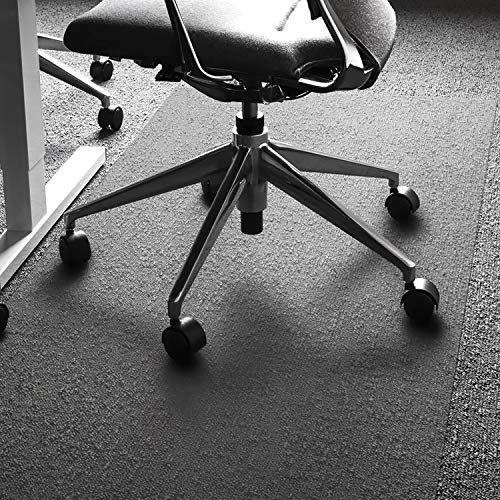
TWICE THE IMPACT STRENGTH OF VINYL: Made from original Floortex polycarbonate. Our premium plastic mats are incredibly tough and durable with twice the impact strength of vinyl to provide a perfectly flat and rigid ergonomic easy glide roll surface. Material is used in aircraft windscreens and bulletproof glass
Creating a Comfortable and Inviting Environment
Creating a comfortable and inviting environment in a home workstation can greatly enhance productivity and well-being. Selecting soothing color palettes, such as soft blues and greens, can promote calmness and concentration within the office. Utilizing natural light is essential; positioning a desk near windows increases energy levels and reduces eye strain caused by artificial lighting. Incorporating indoor plants can further improve air quality and spark creativity. Maintaining a tidy workspace is vital, as clutter can lead to distractions and hinder focus. Personalizing the office with motivational artwork or cherished items also fosters inspiration. By implementing these ergonomic solutions, individuals can create a healthier and more enjoyable work environment, ultimately leading to greater productivity and satisfaction.
Implementing Regular Breaks and Movement Practices
Establishing a routine that includes regular breaks and movement practices is essential for maintaining a healthy home workstation. Professionals should implement the 30:30 rule, alternating between 30 minutes of sitting and 30 minutes of standing. Setting a timer for breaks every 25-30 minutes helps to alleviate muscle tension and boost circulation. Simple movement practices, such as stretching or walking in place, can counteract the sedentary nature of desk work. Using standing desks or anti-fatigue mats encourages changes in position, promoting comfort and reducing strain. Additionally, aim for at least 150 minutes of moderate-intensity movement weekly, as recommended by health guidelines. By prioritizing breaks and movement, individuals enhance productivity and well-being in their ergonomic office environments. Incorporating UV protection and dust resistance into your workspace setup can help maintain the quality of items like electronics and collectibles over time.
Frequently Asked Questions
How Often Should I Replace My Ergonomic Chair?
An ergonomic chair should ideally be replaced every 5 to 7 years. Regular chair maintenance tips include checking for visible wear, ensuring ergonomic chair features remain functional, and recognizing chair replacement signs like discomfort or instability.
Can I Use a Laptop Instead of a Desktop?
Using a laptop instead of a desktop is feasible; it offers benefits like portability and flexibility in creating a workspace. However, performance comparisons often favor desktops for demanding tasks, depending on individual needs and usage patterns.
What Are the Signs of Poor Workstation Setup?
Ironically, a poorly set workstation can enhance discomfort. Signs include improper desk ergonomics, inappropriate monitor placement causing strain, and incorrect chair height leading to fatigue. These elements collectively foster an environment that hinders productivity and well-being.
How Does Lighting Affect My Workstation Health?
Lighting considerably impacts workstation health. Ideal ambient lighting, complemented by natural light, reduces eye strain. The right color temperature enhances focus and mood, fostering a more productive and comfortable working environment for individuals.
Are There Specific Stretches to Do During Breaks?
During breaks, specific stretching techniques can enhance comfort. Incorporating stretches regularly improves flexibility and reduces tension. Break frequency is essential, as consistent movement and stretching offer significant ergonomic benefits, promoting overall well-being and productivity at workstations.