Common workstation setup mistakes can lead to pain over time. Poor chair height and monitor misalignment cause neck and back strain. Additionally, inappropriate keyboard and mouse heights can elevate discomfort in the upper body. Excessive sitting adds pressure to the spine and worsens overall posture. Ergonomic adjustments, such as maintaining eye level for monitors and proper chair alignment, can improve comfort. Understanding these principles is essential for long-term well-being. Discover more solutions for a healthier workspace.
Key Takeaways
- Misaligned monitor height can strain the neck; it should be at eye level or slightly below to maintain good posture.
- Incorrect chair height leads to feet dangling or knees above hips; adjust to keep feet flat on the ground.
- Poor keyboard and mouse placement causes elevated shoulders and strained wrists; ensure elbows are slightly below 90 degrees for comfort.
- Prolonged sitting without breaks increases spinal pressure and discomfort; take short breaks every hour to improve circulation.
- A cluttered workspace can promote poor posture; keep your desk organized to encourage proper alignment and reduce injury risk.
Importance of Good Posture
Why is good posture essential in a workstation setup? Good posture is vital for maintaining proper alignment when sitting at a desk. It helps align the spine and supports muscle function, reducing strain on ligaments and muscles. This alignment can prevent common problems such as neck pain and back pain. Key factors include adjusting chair height to promote a natural curve in the spine. Sitting with a straight back, a neutral head, and relaxed shoulders are also important. Engaging the core and keeping feet flat on the ground contributes to stability and comfort. Regularly practicing good posture not only enhances physical well-being but can also boost concentration and productivity, making it easier to stay focused throughout the workday. An ergonomic office chair with adjustable features is crucial for personalizing support and maintaining a healthy posture throughout prolonged periods of sitting.
Common Desk Setup Mistakes

Achieving good posture is a step toward a productive workspace, but common desk setup mistakes can undermine these efforts. An ergonomic desk setup requires the monitor height to be properly aligned at eye level. This helps maintain neck alignment and reduces strain. The chair height should also guarantee the feet rest flat on the floor, and the knees are level with the hips. Improper placement of the keyboard and mouse can lead to shoulder scrunching and increased muscle fatigue. Furthermore, excessive periods of sitting without breaks can worsen discomfort. Keeping the desk organized and clutter-free promotes better posture and minimizes the risk of repetitive strain injuries. Emphasizing these factors contributes to a more effective and sustainable workspace. Incorporating ergonomic design benefits such as sit-stand desk functionality can further enhance comfort and reduce the risks associated with prolonged sitting.
Monitor Misalignment Issues

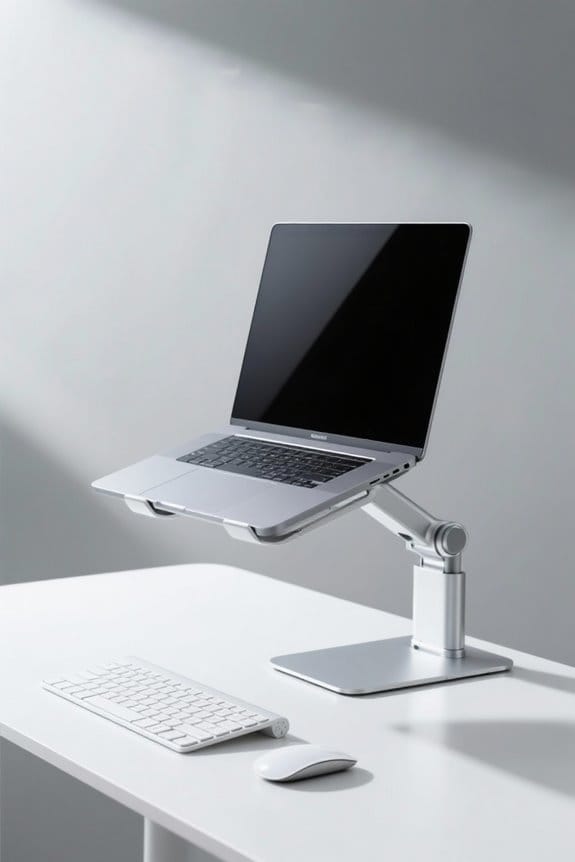
When monitor misalignment occurs, it can lead to discomfort and reduced productivity in the workplace. Typically, it arises when the screen is positioned too high or too low, causing unnecessary strain on the neck and back. The ideal monitor height should be at eye level or slightly below, which helps maintain a back straight posture. Proper alignment minimizes excessive head rotation and reduces strain on neck and shoulder muscles. Additionally, positioning monitors too far away may prompt leaning forward, leading to further discomfort over extended periods. Ensuring that the monitor is correctly aligned with the work area is crucial for preventing these issues. Adjustable height options on monitor stand risers provide personalized comfort, effectively reducing neck and back strain. Taking these steps can greatly reduce strain and enhance overall well-being during work hours.
Keyboard and Mouse Height Problems

Proper keyboard and mouse height often goes overlooked in workstation setups. Incorrect heights can cause elbows to flex above 90 degrees, leading to shoulder scrunching and increased muscle fatigue. When the keyboard and mouse are too high, users must elevate their shoulders, causing discomfort in the upper back and neck. Ergonomic standards recommend that elbows should be slightly below 90 degrees for ideal alignment. This positioning promotes a neutral wrist position, reducing the risk of carpal tunnel syndrome. It is vital to guarantee that the chair height allows for proper mouse and keyboard placement. By addressing these concerns, users can minimize repetitive strain injuries and enhance overall comfort during prolonged computer use. Consider making these adjustments for a healthier workspace. Additionally, integrating ergonomic support features like armrest pads can further alleviate discomfort and improve posture during work sessions.
The Impact of Excessive Sitting

How does excessive sitting affect overall health and comfort? Prolonged sitting is linked to increased pressure on the spine, leading to lower back pain and discomfort. Poor posture often accompanies excessive sitting, causing muscle tension in the neck, back, and shoulders. The average office worker sits for about 10-15 hours a day, exacerbating musculoskeletal issues and resulting in long-term health consequences. Research shows that excessive sitting is associated with chronic conditions like obesity and heart disease. To counteract these effects, incorporating short breaks every hour can help reduce strain and improve circulation. Adjusting the height of workstations can also promote better posture. Using anti-fatigue mats can enhance comfort and reduce fatigue for those who stand for long periods, which is particularly beneficial in environments where movement is encouraged. Prioritizing movement is essential for maintaining overall well-being while working.
Ergonomic Adjustments for Better Comfort
Ergonomic adjustments serve as a significant factor in enhancing comfort during work. The chair height should guarantee the feet rest flat on the floor, with knees at a 90-degree angle to reduce strain. Monitor height must be adjusted to eye level to minimize neck pain and promote a comfortable viewing angle. A proper setup keeps the keyboard and mouse close, preserving a straight wrist position while elbows remain bent. Footrests can help maintain spine alignment when chair height is insufficient. Regular work breaks are also essential to relieve pressure and enhance circulation. Many ergonomic chairs, like COLAMY Home Office Chair, feature adjustable components that support diverse body types, ensuring comfort and productivity. Prioritizing these ergonomic adjustments can greatly reduce strain, promoting a healthier workspace. Implement these changes for improved comfort and productivity today.
When to Seek Professional Help
While making ergonomic adjustments is essential for comfort, attention must also be directed toward persistent pain or discomfort. If an individual experiences ongoing pain in the neck, back, or wrists despite these adjustments, it may signal a need for professional evaluation. Signs such as numbness or tingling in fingers could indicate carpal tunnel syndrome, requiring specialized treatment. Additionally, if sharp or chronic pain disrupts daily activities, consulting an orthopedic specialist for appropriate assessment and intervention is vital. Early intervention can prevent long-term complications from repetitive strain injuries. High-density memory foam cushions can provide durable comfort and support, potentially alleviating some discomfort. Consequently, if discomfort persists after making ergonomic changes, seeking professional help should be a priority to maintain a healthy and productive work environment.
Frequently Asked Questions
Can Ergonomically Incorrect Workstations Cause Discomfort?
Ergonomically incorrect workstations can indeed cause discomfort. Poor monitor placement, inadequate desk height, improper wrist support, and incorrect eye level lead to strain, while neglecting posture correction and break frequency exacerbates issues like back and wrist pain.
What Are the Common Ergonomic Mistakes?
Common ergonomic mistakes include improper chair height, poor keyboard placement, incorrect monitor distance, excessive desk clutter, screen glare, inadequate foot positioning, poor wrist alignment, inappropriate seat depth, and neglecting posture adjustments, all contributing to discomfort.
What Are the Risks of Poor Workstation Set Up?
Poor workstation setup risks include improper workstation height, inadequate monitor distance, insufficient chair support, wrong keyboard angle, misaligned wrists, poor foot placement, screen glare, and neglecting frequent breaks, all negatively impacting posture and overall health.
What Is the Pain Associated With Prolonged Computer Use?
Prolonged computer use leads to posture issues, eye strain, and neck tension; it also causes wrist pain, back troubles, fatigue levels, hand numbness, muscle soreness, and joint stiffness, greatly impacting overall comfort and productivity.